

What's new in tprm.mlab.sh
Stay up to date with the latest releases, improvements and fixes for the self-hosted DORA Third-Party Risk Management platform.
v1.6.1 Latest
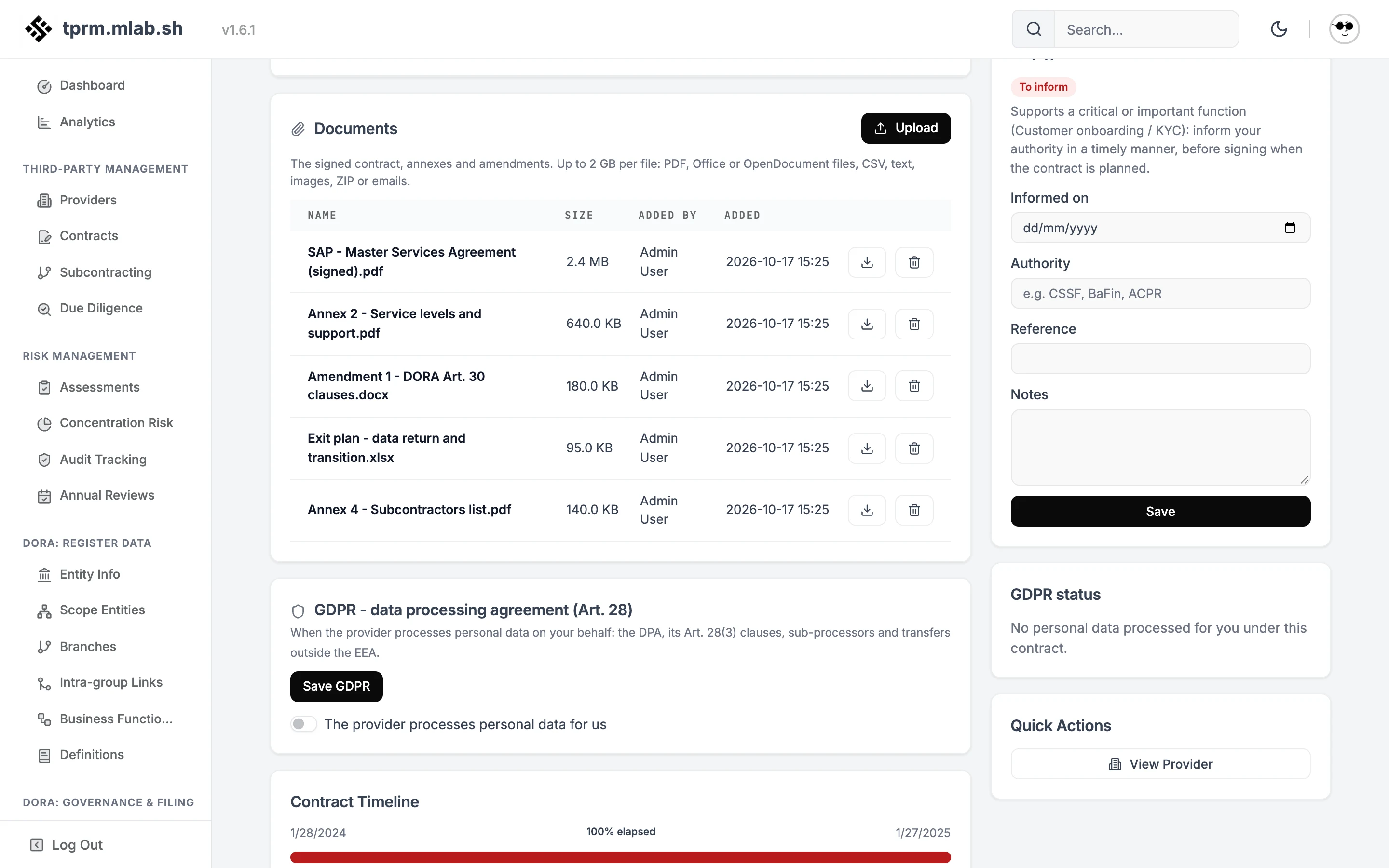
Contracts keep their documents: the signed agreement, annexes and amendments, stored in your own S3 bucket.
- Database migration V46 applies automatically on startup.
- Documents need an S3 bucket. Set
S3_ENDPOINT,S3_BUCKET,S3_ACCESS_KEY_IDandS3_SECRET_ACCESS_KEY; the bucket must exist. Without them the platform works as before and the Documents card says storage is not configured.docker-compose.ymlcarries a ready-to-uncomment example with Silo. - A reverse proxy in front of the platform must accept uploads as large as
S3_MAX_UPLOAD_MB(2 GB by default); for nginx,client_max_body_size. - We recommend a lifecycle rule on the bucket that removes incomplete multipart uploads after a day, in case the server stops in the middle of an upload.
- Documents on every contract. Upload one or several files at once with a progress bar, download them, delete them. Deleting a contract deletes its documents too.
- Your storage, any S3. AWS, Scaleway, OVH, MinIO, Silo or any S3-compatible service, with path-style or virtual-hosted buckets and an optional folder prefix. An administrator can check the bucket and keys from the platform: it writes, reads back and deletes a test object.
- Large files. Files are streamed to S3 in parts as they arrive, never held in memory, so a 2 GB file costs the server no more memory than a small one. Downloads are streamed too.
- Documents of another organization are never listed, downloaded or deleted.
- Only PDF, Office, OpenDocument, CSV, text, image, ZIP and email files are accepted, checked in the browser and again on the server. Downloads are served as attachments with their declared type, never rendered in the page.
- File names are cleaned (no folders, control characters or quotes) and never used in the storage key. Every document keeps its SHA-256, and uploads and deletions are in the audit log.
- An upload refused, interrupted or failing on the storage side leaves nothing behind: no partial object, no record.
v1.6.0
The register is checked the way the EBA checks it before you file, DORA Pillar 4 is covered end to end (concentration, subcontracting, designated CTPPs, incidents, authority notice, supervisory conditions), GDPR processor agreements live on the contract, and your team can sign in with single sign-on.
- Database migrations V36 to V45 apply automatically on startup. Back up your volumes first, as for any upgrade.
- New instances start with a locked administrator. Set
ADMIN_INITIAL_PASSWORD(12 characters or more) foradmin@localhost, or use the one-time setup link printed in the logs on first start. Existing instances keep their accounts. - Single sign-on needs
PUBLIC_URL, the address your users reach the platform at: the redirect URI to register at your identity provider is<PUBLIC_URL>/api/v1/auth/sso/callback. - The platform can no longer be embedded in an iframe (
X-Frame-Options: DENY).
- Validation before filing. The exported package is checked the way the EBA reception does: technical checks, primary keys (805, 806), the 24 foreign keys (807), allowed codes (503) and the 58 active DPM business rules. The result comes out as the EBA
detailed-feedback.csv, and the review page groups findings by category so a long list stays readable. - Exports follow the EBA RoI FAQ. « Not Applicable » where a key has no value, LEI code types mapped as expected, and no B_02.03 intra-group links to non-ICT arrangements.
- Online identifier checks, off by default. Turn them on in Organization settings and every LEI of the register is checked at GLEIF (exists, issued, entity active), the checks the EBA runs as VR_2, VR_12, VR_23, VR_71 and VR_77. EUIDs are checked for format: BRIS offers no public API.
- Concentration risk (Art. 29). A level per provider from the critical or important functions it supports, how hard it is to replace, multiple contracts, related companies under the same parent, a provider or data outside the EEA, and the length of its subcontracting chain.
- Subcontracting under RTS 2025/532. The ten conditions to assess before allowing subcontracting (Art. 3), the twelve contract clauses (Art. 4), and a register of material changes with the notice period, your decision, « no objection » at the deadline, and the termination rights of Art. 6.
- Designated critical ICT third-party providers. The 19 providers on the ESA list of 18 November 2025, with their LEIs and groups verified at GLEIF, are recognised by LEI, by group or by name. They carry a badge, count in the concentration assessment, and a readiness view checks what a suspension or termination under Art. 42 would need: a tested exit plan, transition, alternatives, data return, termination rights and notice.
- Supervisory conditions before contracting (Art. 28(4)(b)). A due diligence section with six checks (authority access and audit rights, third-country law, CTPP through its EU subsidiary, Art. 42 measures, authorisation, authority informed), each with a suggestion drawn from your Art. 30 reviews, the provider and data locations, the CTPP list and your notices. You decide; a verdict sums it up.
- Competent authority informed (Art. 28(3)). Contracts that support a critical or important function are flagged « to inform »; the date, authority and reference are recorded on the contract.
- Conflicts of interest (Art. 28(4)(e)) join the due diligence checklist, now nine items.
- Third-party incidents classified under DORA. Criteria and thresholds of Regulation 2024/1772 with the major verdict and its legal basis, recurring incidents, the deadlines of the initial, intermediate and final reports (2025/301), and report drafts laid out as 2025/302. Filing stays on your authority's portal.
- Processor agreements on the contract. The Art. 28(3) clauses, sub-processors with their authorisation regime and objection period (Art. 28(2) and (4)), and transfers outside the EEA with their mechanism (adequacy, standard clauses, BCR). Sub-processors can be imported from the DORA subcontracting chain.
- Public footprint of a provider. A scan of the provider's domain with mlab.sh lists the third parties visible from outside: mail and SaaS services, hosting and CDN, DNS operator, certificate authorities, registrar and what its website loads, with a link when they are already in your register. It is a preview of public data, not the provider's subcontracting chain, and it is not meant for large providers: the page says so.
- Your mlab.sh quota is spared. A scan runs only when you click, a scan under seven days old is reused, and the page tells you before you click when the key is missing or invalid or the quota is empty.
- mlab.sh API key per organization in Organization settings, with a Test key button. The key is never shown again once saved;
MLAB_API_KEYsets one for the whole instance.
- OpenID Connect per organization. Microsoft Entra ID, Okta, Google, Keycloak or mlab.sh: enter the issuer, client ID and secret, and the email domains allowed. Users click « Sign in with SSO » and their account is created at first sign-in.
- SSO only. Turns off passwords, password resets and invitations for everyone but local administrators, who keep their password as the way back in if the identity provider fails. It cannot be turned on without one.
- Choose your reporting framework. Run the platform with the DORA register, filing and governance pages, or as plain third-party risk management without them. Turning DORA off hides its pages; the data is kept.
- One Organization page with General, Team, License and API keys tabs.
- Session cookies no longer reach the logs, password reset links are stored hashed and expire, failed sign-ins are rate-limited, and API keys are managed by administrators only.
- Security headers on every page, and HTML escaping that covers quotes.
- With ClickHouse 26.9, migrations were replayed on every start; an unreadable migration version now stops the migration instead.
- Statuses of assessments, contracts, due diligence and incidents are validated, and the provider risk score is shown.
- The version shown in the interface is the real one; dead links are gone, charts read well in the dark theme, and pages keep a margin above the footer.
v1.5.1
A cleaner interface in line with mlab.sh, a new licensing model with signed licenses and one place per instance, and checklists and exit plans that follow the text of DORA.
- A license key is now required, on Free too. An instance without
LICENSE_KEY, or without a valid license, is paused until it gets one. Your key is under Organization > TPRM > License on mlab.sh. - One place per instance. Each running instance holds a place on the license. If you run more instances than your license has places, the extra ones are paused; ask us to raise the number of places.
- Database migrations V22 to V35 apply automatically on startup. Back up your volumes first, as for any upgrade.
- Signed licenses. mlab.sh now issues a license signed with its own key, which your instance checks before trusting it. Nothing that is not mlab.sh can make an instance licensed.
- A week offline. The license is kept in your database for 7 days, up from 48 hours, so the platform keeps working across restarts and while mlab.sh is unreachable.
- Places for each entity or branch. Several instances can share one key, one place each. Organization > TPRM > License on mlab.sh lists every instance (host, version, last check-in) with a button to release its place. An instance silent for 3 hours gives its place back on its own.
- Use this instance. When every place is taken, an administrator can take one from the locked page: the instance heard from least recently gives up its place.
- Clear status. Settings > License shows why the instance is or is not licensed (active, offline, no key, unknown key, no place free, expired), until when the license is valid, the last confirmation, the places on the license and a Check now button. The locked page tells administrators what to do; your data is never touched while the platform is paused.
- Same design as mlab.sh. Cards, buttons, forms, badges and page titles now share the mlab.sh components: white cards on a light grey background, consistent sizes and spacing on every page.
- One colour scale for risk and status. Critical, high, medium and low read the same everywhere (providers, incidents, audits, exit plans, concentration), and every badge label meets WCAG AA contrast in light and dark themes.
- Easier to read. Secondary text is darker, identifiers and codes use a monospace font, and long labels wrap instead of being cut on small screens.
- Dark theme. Buttons, pagination and highlights stay neutral instead of turning green.
- Notifications. Redesigned with a title, an icon and a progress bar that pauses while you hover them. Confirmation dialogs open reliably every time.
- Article 30 checklist follows the article. Nine points for 30(2), lettered (a) to (i), and six for 30(3), lettered (a) to (f).
- Due diligence with an opinion per item. Each checklist item records a verdict, a comment, who assessed it and when, instead of a yes/no switch.
- Exit plans say more. What triggers the plan, how long the transition should take, what happens to the data, who owns it and how the last test went. A plan can be attached to the contractual arrangement it covers.
- Risk assessments. A title, a link to the source document, and the contractual arrangement they cover, so B_07.01 is reported against the right contract.
- Providers. Criticality answers the DORA question only (supports a critical or important function, or not applicable), the category is the nature of the arrangement (ICT, BPO, non-ICT, other), the status follows the relationship with a separate remediation flag, and a second identification code can be recorded (B_05.01).
- Countries. A searchable country picker, and subcontractors can be located in several countries.
- Business function criticality offers « not assessed », as B_06.01 expects.
- Article 30 and due diligence answers are stored against the question shown on screen; several used to land on another requirement.
- A risk assessment title entered in the form is now saved.
- Breadcrumb separators showed as an empty box.
- The active sidebar entry, search filters and the account menu were not highlighted.
- Some status badges showed in an unrelated purple.
- Notification text is shown as plain text and never interpreted as HTML.
v1.5.0
Third-country branches under DORA: file a register of information as the branch of a non-EU head office.
- Third-country branch support. Declare the entity maintaining the register as a branch of a head office established outside the Union, capturing the head office name, LEI, country and the entity type it would qualify as in the EU. Follows Q&A DORA102 (ID 3097), and for CSSF-supervised branches, Circular 26/915, which applies with immediate effect from 27 August 2026 with no transitional period.
- DORA applicability test. A guided « would qualify » test in Entity Information listing every Article 2(1) entity type, with a clear notice when none of them matches.
- Competent-authority reference. A versioned reference file maps each authority to the subset of Article 2(1) it supervises, along with its national-regime reminder and sources. Choosing a type outside that subset raises a non-blocking warning. An authority with no entry behaves generically and raises nothing.
- Branch rows filled automatically (B_01.03). The reporting branch is recorded and exported on its own, keyed on its identification code and head-office LEI, without duplicating a row you entered by hand.
- B_01.01 for a branch. Reports the branch LEI where GLEIF has issued one, falling back to the head-office LEI, and carries the head office equivalent entity type. The reported country stays the country of the branch, never the third country.
- B_04.01 for a branch. An arrangement that names no using entity now defaults to
eba_ZZ:x838(branch of a financial entity) with the branch code and head-office LEI, matching the way B_01.03 keys a branch. - ICT and non-ICT are separated. Only ICT arrangements feed the register. Non-ICT and other third-party arrangements stay in the outsourcing register and no longer reach B_02.x, B_03.x, B_04.01, B_05.x or B_07.01.
- Stricter LEI checks. The EBA shape (18 alphanumerics followed by two check digits) is now enforced as an error, and the ISO 17442 check digits are reported as a warning.
- Exports stop, listing the arrangements at fault, when a contractual arrangement carries no service at all and its ICT nature cannot be established.
- New referential checks: a branch code used in B_04.01 must exist in B_01.03, every branch row must carry a well-formed head-office LEI, and a head office also listed as an in-scope entity raises a warning since it is not itself subject to DORA.
- A branch code recorded against a using entity marked as « not a branch » is no longer exported, and is reported so the contradiction is visible.
v1.4.4
Rebranding, a global UI pass and a Register Readiness panel.
- Register Readiness. A panel at the top of Analytics fed by the same checks as the Validate button: deposit verdict, error, warning and notice counts, a per-template breakdown coloured by severity and the top five blocking points.
- Rebranding and a global UI/UX pass across every page.
- Reporting is now Analytics (
/an/), removing the ambiguity with DORA reporting in the sense of the register to be filed.
- SQL errors are no longer silent anywhere: all seventeen delete paths and the account, organisation and API-key writes return HTTP 400 instead of a false « success » when a write is refused by an integrity constraint.
- Removed a dead reporting module that was never compiled, together with two stale licence-gating branches pointing at routes that did not exist.
v1.4.2
Services per arrangement, outsourcing and proportionality registers, assessment approvals.
- Services per contractual arrangement. Each arrangement now carries its own services, each with a nature (ICT, non-ICT or other), an ICT service type, data location at rest and in processing, and a sensitivity. This is the real grain B_02.02 and B_07.01 are keyed on.
- Outsourcing register (
/or/) covering every third-party arrangement, not only the ICT ones. - Proportionality register (
/pr/) to record mitigation decisions. - Annual provider reviews (
/rv/) with a monitoring questionnaire. - Assessment versioning and approvals. Risk assessments are versioned and carry an approval workflow.
- B_02.02 and B_07.01 are generated at the contract by service grain instead of one row per contract.
v1.4.1
Richer dashboard metrics, a demo seeding script and a round of UI fixes.
- A demo seeding script that populates a complete working dataset in one run.
- Richer dashboard metrics across the overview.
- Modal and popup behaviour corrected across the application, including providers, incidents, intra-group, scope entities, subcontracting and API keys.
v1.4.0
Full Register of Information conformance, all 15 EBA templates aligned to RF 4.0 and deposit-ready.
- Entities within scope (B_01.02). Dedicated module to declare every in-scope entity with controlled entity-type (
eba_CT:), country (eba_GA:), reporting (eba_RP:) and currency (eba_CU:) codes, the full 11 official columns. - List of branches (B_01.03). Record branches with their head-office LEI, name and country, completing the B_01 block.
- Definitions (B_99.01). A definitions sheet feeding the template’s 19 columns, so the register exports its full taxonomy context.
- Referential-integrity validation. A Validate button reports missing entity/LEI, absent or duplicate contract references and orphan keys before you build the package.
- Per-template export. Download any single template as CSV (⬇ per row) alongside the full
.zipdeposit package.
- All 15 templates realigned to RF 4.0. B_01.01, B_05.01, B_06.01 and B_07.01 had their columns re-mapped to the official positions; every typed field now uses controlled EBA vocabularies (
eba_TA,eba_qCO,eba_GA,eba_CU,eba_ZZ,eba_CO,eba_BT,eba_RP,eba_CT). - Providers carry a real LEI and code type (qCO). The export now identifies providers by their LEI instead of an internal UUID across B_02.02, B_03.02, B_05.01, B_05.02 and B_07.01.
- DORA contract specifics wired end-to-end (B_02.02). Notice period, governing law, provision & data-storage country, data locations and sensitivity/dependency flags are now captured and exported.
- Exit-plan existence (B_07.01) is derived automatically from a recorded exit strategy.
- The xBRL-CSV package sets
decimalsMonetaryprecision and the official deposit naming, with per-templateFilingIndicators.
- Business writes (providers, contracts, functions, assessments, entity-info) now surface SQL errors as HTTP 400 instead of a silent false « success ».
- Quick status changes on an assessment no longer wipe the other fields.
- Function ↔ provider linking (« Link Provider » returning « Not found ») and the Entity Info form not repopulating after reload are fixed.
- Corrected B_03.x link-column codes (e.g. B_03.03 set to the official
0031) and several CSV header column counts.
v1.3.0
Subcontracting chains, function mapping and a sturdier register validator.
- ICT supply chains (B_05.02). Map subcontractors per contract and provider with rank (direct / indirect), country and the 19 official
eba_TA:S01–S19service-type codes. - Function ↔ provider mapping (B_06.01). Many-to-many links between business functions and providers, each carrying its contract and ICT service type.
- Intra-group links (B_02.03). Chain client ↔ intra-group provider ↔ external TPP with contract-reference autocompletion.
- Register validation now reports errors, warnings and infos per template, covering referential integrity, LEI/date/EBA-code formats, mandatory fields and uniqueness.
- Faster aggregation across all 15 templates when building the deposit package.
v1.2.0
Concentration risk, exit strategies and richer analytics.
- Concentration risk analysis. By category and geography, with doughnut/bar charts and risk thresholds (>50% high, >30% medium).
- Exit strategies (Art. 30). Document, version and schedule tests of exit plans for critical ICT dependencies.
- Advanced analytics dashboard. Compliance progress bars, top-risk providers and expiring-contract widgets.
- Provider detail view consolidated into five tabs: Overview, Contracts, Assessments, Exit strategy, Incidents.
v1.1.0
Due diligence, audit tracking and the Article 30 checklist.
- Due diligence (Art. 28(4)). Pre-contractual checklist with decision and risk summary.
- Audit tracking (Art. 28(5-6)). Audit types, finding severity and corrective-action follow-up.
- Article 30 checklist. Art. 30(2) clauses for every contract and Art. 30(3) clauses for critical/important functions.
v1.0.1
Reliability patches: SQL errors surfaced, export fixes, simple extract.
- All business writes (create / update) now surface SQL errors to the UI, no more silent false « success ».
- Corrected several edge cases in the EBA CSV export (escaping, empty controlled-code fields, per-template downloads).
- Added a simple extract path for quick, raw CSV pulls of the register.
v1.0.0
Initial release: DORA register, the 15 EBA templates and the xBRL-CSV deposit package.
- DORA register of information (Art. 28(3)). Consolidated view of every ICT third-party arrangement.
- 15 EBA ITS templates (Reporting Framework 4.0) with controlled
eba_*codes: B_01.01 … B_99.01. - Deposit-ready xBRL-CSV (.zip) package matching the official structure (
META-INF/reportPackage.json,reports/report.json,parameters.csv,FilingIndicators.csv+ 15 CSVs). - Provider, contract, risk-assessment and third-party incident management.
- Self-hosted Rust / Actix-web stack with MySQL + ClickHouse, deployed via Docker Compose.